IMAP to Office 365 Migration Tool for Fast & Secure Email Transfers
Migrate the IMAP-supported clients mailbox data, including emails, attachments, labels, and metadata properties, from any IMAP clients to Exchange Online. Preserve and maintain the original folder structure and hierarchy, ensuring no data loss.
Explore the key highlights and advanced features of Shefware IMAP to Office 365 Migration Software.
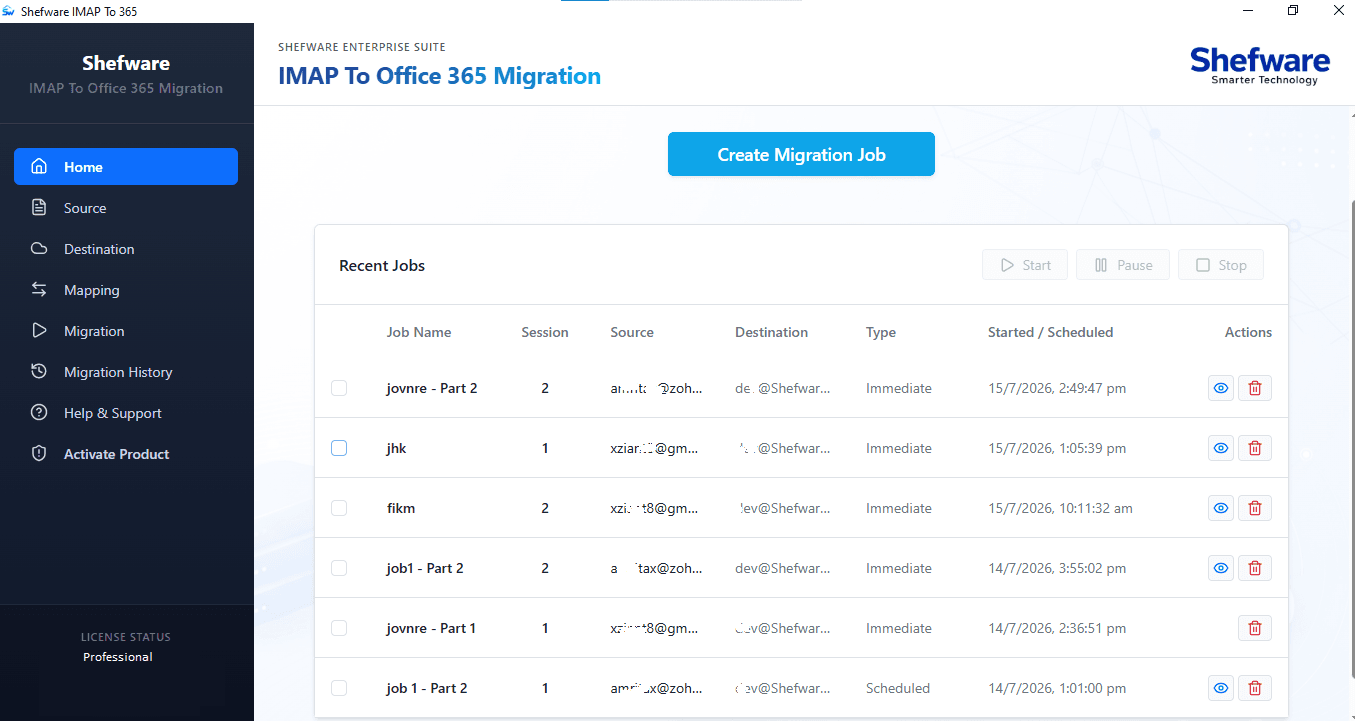
Migrate the mailbox data from any IMAP clients’ accounts, such as Gmail, Zoho Mail, Yahoo, and Thunderbird to Office 365.
Perform IMAP migration with no data loss.
Migrate IMAP mailbox new arrive data to Office 365 mailbox with the Incremental migration feature.
Apply filters such as Date Range and Folder Selection to move only the desired data to Microsoft 365.
IMAP to Office 365 Tool fully Compatible with all versions of Windows.
Facility to automate the migration Job by Schedule features helps to migrate data at the specific and preferred time.
Migrate multiple mailboxes from any IMAP account to Office 365 using batch of CSV.
Add one or multiple IMAP clients’ accounts for mailbox migration to Microsoft 365.
Manage migration history and status in the detailed migration report and also export the report for analyses the migration summary.
Preserves and maintains the original hierarchy and structure.
Create the Job Name to identify, access, and monitor the migration process.
Enter a custom target folder name to migrate mailbox data in Office 365.
Migrate 30 items per folder in the demo version, using the Free IMAP to Office 365 Migration Tool.
Explore the real-life situations where IMAP to Office 365 migration software is used:
Migrate multiple IMAP clients’ mailbox data and attachments to Office 365 simultaneously. Preserve and maintain the original email hierarchy and provide accurate results, ensuring no data loss.
Move the selected folders and their contents to Office 365, enabling organization, without any unnecessary data. Apply the date range filter to transfer the mailbox items within the specific date range.
Move the Webmail new emails to Office 365 and skip the previously migrated items automatically, ensuring no duplicate items are migrated and stored in Office 365 using the IMAP to O365 Migration Tool.
Explore the main features and capabilities to easily move the IMAP emails to Office 365.
Move multiple emails, attachments, and metadata properties to Office 365 simultaneously, reducing the time and manual effort to select and migrate the data repeatedly.
Transfer IMAP mailbox data to Office 365 after selecting the desired folders, ensuring the necessary data migration, and preventing the transfer of unnecessary items.
Easily migrate the mailbox data from multiple IMAP-enabled email clients such as Godday Mail, Hostinger Mail, Outlook, Gmail, Zoho to Office 365.
Fully compatible with all versions of Windows operating systems, keeping a user-friendly environment and simplifying the migration process.
Preserves and maintains the original mailbox folder structure, keeping the original email hierarchy intact in the destination mailbox from the source mailbox.
Skip the previously migrated items and move the new items to Office 365, preventing duplicate items in the environment.
Generate and download the detailed migration analysis reports, including details such as skipped items, errors, and migration status.
Move the IMAP mailbox to Office 365 at the desired time and automate the entire migration process, ensuring complete data transfer with minimal downtime.
Offers the demo version where users can migrate 30 items per folder to test and evaluate the tool before purchasing it.
Explore the various IMAP mailbox items that are migrated to Office 365.
Discover the step-by-step method to migrate the IMAP clients’ mailbox data to Office 365:
Download and install the Shefware IMAP to Office 365 migration tool on the system. Launch the tool and click Create Migration Job and enter the job name to start the process.
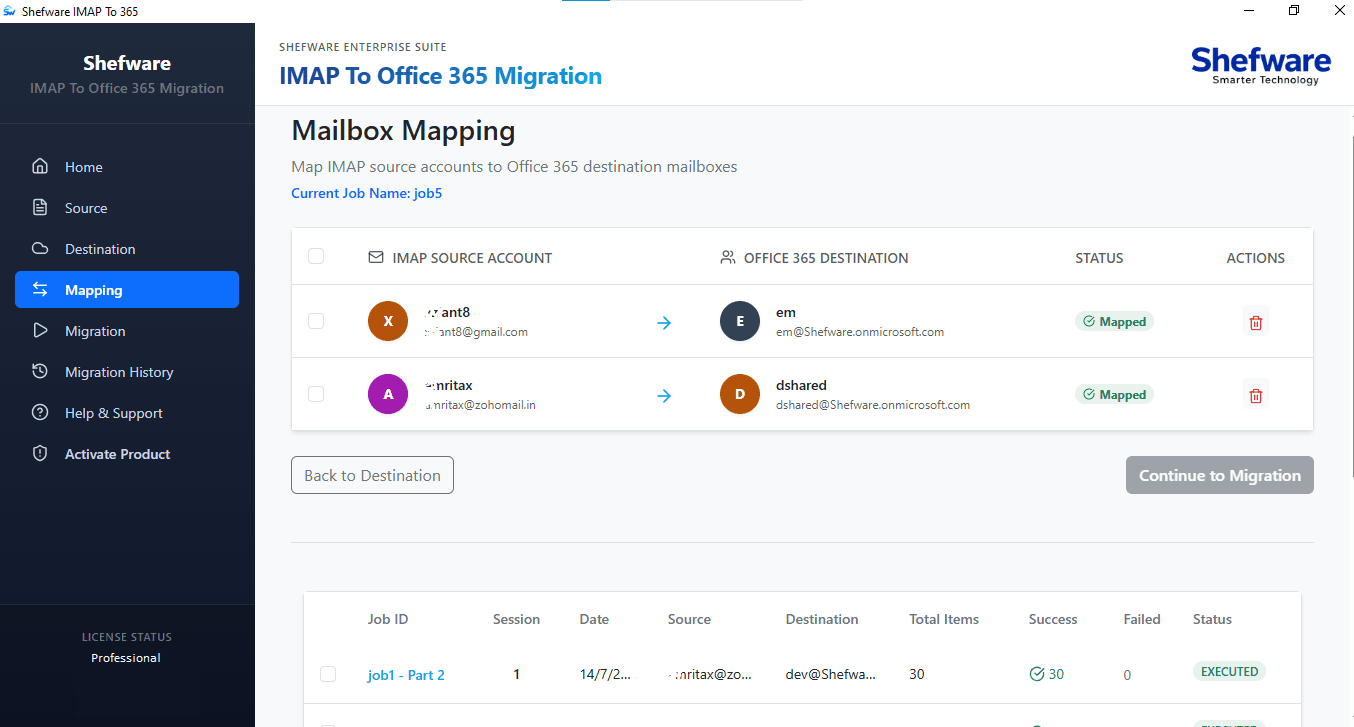
Select the source user account(s) using the Single or Batch Mode and map the source account to the Microsoft 365 destination tenant. This ensures that each account is paired before the migration process starts.
Choose either all folders or specific folders to be migrated to Office 365, ensuring the transfer of critical mailbox items and leaving the unnecessary items.
Migrate immediately or schedule the migration for a preferred time to enable automatic migration of mailbox items.
Click Start migration to move the IMAP mailbox items to Office 365. Utilize the features such as Pause, Resume, or Stop as per your preference. Track the migration process in real time during the migration.
Go to the migration history and analyze the detailed reports such as job status, completed items, and failed items.
Migrate IMAP to Office 365 easily and quickly, ensuring no data loss.
Move the emails from multiple IMAP-supported email clients to Office 365, preserving the original mailbox structure and hierarchy.
Track the migration status in real-time, enabling you to monitor the transferred items and ensure a smooth IMAP Email Migration.
Schedule the migration tasks by choosing the date and time to run the jobs, ensuring minimal disruption.
Download Free Demo & Check System Requirements
Size: 110 MB
Version: 1.0.0.1
Hard Disk
10 GB space required
RAM
Minimum 8 GB RAM (Recommended 16 GB)
Processor
Intel® Core™ 2 Duo CPU E4600 @ 2.40GHz 2.39GHz or above
Operating System - Windows 11, 10, 8.1, 8, 7, Vista, XP, 2000, 98, NT and 95 and Windows Server 2022, 2019, 2016, 2012, 2008 R2, 2008, 2003 R2, 2003
Prerequisites - Requires Internet Connectivity, .NET 10
Microsoft Office 365 - Enterprise E1 / E3 / E5 / Business Premium / Essentials & Exchange Online Plan 1 / Plan 2 & Office 365 A1 / A3 / A5 / F1
“I was able to migrate Gmail to Office 365 using this professional tool. It is literally easy and simple to use. I do not have to worry about any server disruption as the tool migrated all my data seamlessly without any interruption. ”
System Administrator
Ans. Shefware IMAP to Office 365 migration tool is used to migrate the mailbox data from multiple IMAP-supported email clients to Office 365.
Ans. The IMAP migration tool migrates data such as emails, metadata properties, attachments, and labels to Office 365.
Ans. Yes, users can migrate multiple mailboxes to Office 365 using the Shefware IMAP to Office 365 migration tool, reducing the manual effort.
Ans. Yes, users can migrate the selected folders from their source user account to the Microsoft destination account using an advanced IMAP migration tool.
Ans. Yes, go to the migration history to track and monitor the migration process and export the detailed reports to the local folder.